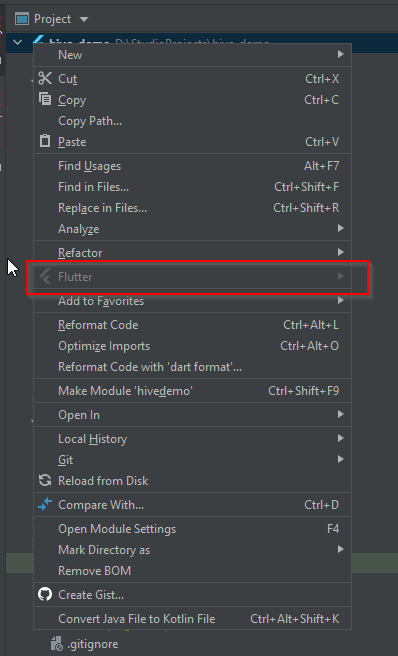
After setup Flutter project code from Git repository. To open android module right click on project and generally it should show as Flutter menu option- > Open Android module in Android Studio option.

At times, There is a chance that Flutter option is disabled as shown below

and your only option to open android module is Go to Android studio Menu File -> Open -> then select android module. You cannot simply start using Flutter menu option.
To resolve this issue,
Step1: Right click on android module then Select New -> File
Step2: Enter File name as your <projectname>_android.iml

Step3: In this <projectname>_android.iml file, paste below code.
<?xml version="1.0" encoding="UTF-8"?><module type="JAVA_MODULE" version="4"><component name="NewModuleRootManager" inherit-compiler-output="true"><exclude-output /><content url="file://$MODULE_DIR$"><sourceFolder url="file://$MODULE_DIR$/lib" isTestSource="false" /><sourceFolder url="file://$MODULE_DIR$/test" isTestSource="true" /><excludeFolder url="file://$MODULE_DIR$/.dart_tool" /><excludeFolder url="file://$MODULE_DIR$/.idea" /><excludeFolder url="file://$MODULE_DIR$/.pub" /><excludeFolder url="file://$MODULE_DIR$/build" /></content><orderEntry type="sourceFolder" forTests="false" /><orderEntry type="library" name="Dart SDK" level="project" /><orderEntry type="library" name="Flutter Plugins" level="project" /><orderEntry type="library" name="Dart Packages" level="project" /></component></module>
That’s it.
Now you can see the Flutter option enabled in when right click on Project and you can Open Android module easily.
Hope it helps.